Best Free Fire Sensitivity Settings for Low-End & High-End Android (2026)
Free Fire sensitivity settings control when the device responds when a user makes an action. It is very important as it controls aiming rate, recoil rate, and overall game. The perfect sensitivity helps a lot to improve gameplay.
There is not a single setting for every player or every device. Sensitivity can be influenced by phone performance, refresh rate, and screen size. For comfortable gameplay, start with the default settings and then customize according to your device.
Why sensitivity matters during the game
The right sensitivity setting makes controls better and helps to stay consistent during the match. You can focus on enemies and fight with them, not with your controls.
The best sensitivity provides you:
Best Free Fire sensitivity settings
These sensitivity settings provide a balance across most Android devices.
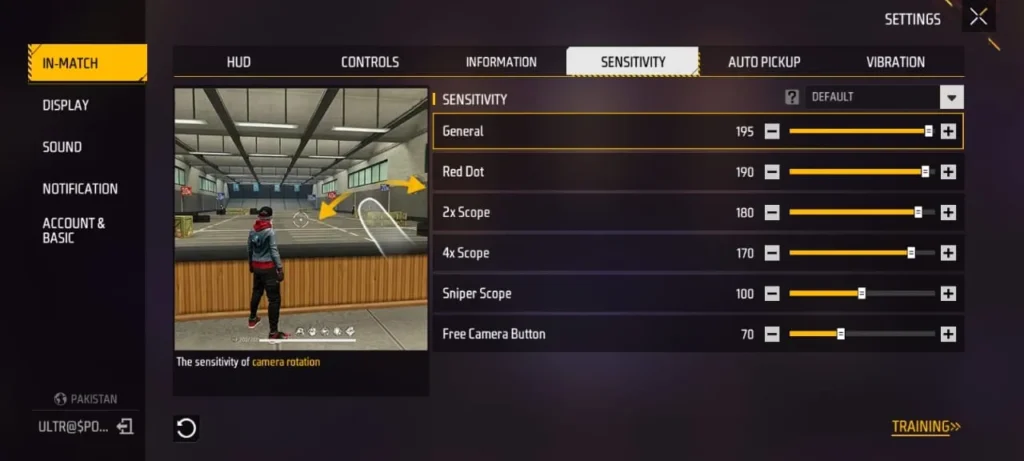
Sensitivity |
Recommended Value |
|---|---|
|
General |
195 |
|
Red Dot |
190 |
|
2x scope |
180 |
|
4x scope |
170 |
|
Sniper scope |
100 |
|
Free look |
70 |
What Each Setting Does
Every setting plays a different but major role in different situations, such as:
General
It controls the camera movement. Higher values help to perform drag shots and react quickly during short-range fights.
Red Dot
It helps to maintain better tracking while using a rifle or a smg, it also improves aiming with a red dot sight.
2× Scope
It provides smooth gameplay during medium range devices, and it provides a balance between speed and recoil.
4× Scope
It helps to play smoothly during long-range fights, and it also maintains the scope performance.
Sniper Scope
This helps when you are using snipers; it makes it easier to drag headshots.
Free Look
When you are running or scouting, this helps to look around quickly without affecting your gameplay.
Getting the Best Results
To get the results from your setting, spend a while in training grounds to ensure the setting matches your gameplay or device performance. If needed for optimization, make a little change of 5-10 points and then check.
Best Free Fire Sensitivity Settings for all devices
These are different sensitivity settings that are recommended for specific devices
Best Free Fire Sensitivity Settings for Low-End Devices
If you’re playing Free Fire on a phone with 2GB to 4GB of RAM, you can use these sensitivity settings for improved gameplay.
Sensitivity |
Value |
|---|---|
|
General |
200 |
|
Red Dot |
195 |
|
2× Scope |
185 |
|
4× Scope |
175 |
|
Sniper Scope |
105 |
|
Free Look |
75 |
Best Free Fire Sensitivity Settings for Mid-Range Devices
Phones with 4GB to 8GB RAM usually offer better FPS and touch response. These are recommended settings for those devices.
Sensitivity |
Value |
|---|---|
|
General |
195 |
|
Red Dot |
190 |
|
2× Scope |
180 |
|
4× Scope |
170 |
|
Sniper Scope |
100 |
|
Free Look |
70 |
Best Free Fire Sensitivity Settings for High-End Devices
The phones with 8GB RAM or more provide a smooth gameplay. For these devices, you can use low sensitivity settings to improve gameplay.
Sensitivity |
Value |
|---|---|
|
General |
185 |
|
Red Dot |
180 |
|
2× Scope |
170 |
|
4× Scope |
160 |
|
Sniper Scope |
95 |
|
Free Look |
65 |
How to find the perfect Sensitivity
You can find the best sensitivity setting by following these routines.
Start with default Values
First, start your game with default settings before making a change. Analyze sensitivity problems from default values.
Use recommended settings
Use the recommended settings according to your device as discussed above. These provide a balanced sensitivity across most Android devices.
Practice in Training Ground
Test different weapons, scopes, and different fighting situations. Configure how your sensitivity works when you track your enemies.
Make Small Adjustments
If you find a problem in the sensitivity, optimize that specific sensitivity by 5-10 points. Do not change many values at a time.
Play different matches
After practising in the training ground, also test your sensitivity in the CS or BR modes. After playing several matches, you can move to rank matches.
Common Mistakes of Free Fire Sensitivity
Even the best sensitivity settings could not improve your gameplay if you make these mistakes. Avoiding these mistakes can help you make consistent gameplay.
Copying Other Players’ Settings
Do not copy the settings of other players; their sensitivity settings are suitable for their phone and gaming style. Those settings may not work on your phone the same as they did on their phone.
Changing Sensitivity Too Often
Frequently changing settings makes it difficult to configure the perfect setting. Once you find a comfortable setup, spend time making muscle memory according to this, if needed, then optimize settings.
Using High Sensitivity
Higher sensitivity is not always good. Because of this, your aim won’t be accurate, and your screen becomes very quick. It makes the game difficult, not comfortable.
Ignoring Your Device System
Every device performs differently on different sensitivity values. There is a need for slightly high sensitivity on low-end devices. High-end devices can perform well on low sensitivity.
Skipping Practice
After applying new settings, spend some time in the training ground. Avoid playing rank matches after any change. This helps you to understand your sensitivity without decreasing your rank score.
Conclusion
The best Free Fire sensitivity setting is the one that makes you comfortable and improves your gameplay. For a start, you can choose recommended values if you find your default setting uncomfortable.
Practice every setting and focus on making muscle memory, avoiding making a change after every match. This helps to enjoy a smoother and better gameplay.